Is Spicy Chat AI Down? Status, Outages & Troubleshooting Guide (2026)
The fastest way to check if SpicyChat AI is down: open the SpicyChat Discord server. Server outages get announced there within minutes, usually before any status page updates. If Discord shows no announcements and other users aren't reporting issues, the problem is almost certainly on your end — which this guide will fix.
SpicyChat AI has a known history of technical issues: duplicate messages, login failures, send-button freezes, and periodic maintenance windows. Most are solvable. Here's how to diagnose and fix each one.
Is SpicyChat AI Down Right Now?
Three ways to check current status in under 30 seconds:
1. SpicyChat Discord server. The most reliable real-time source. The #announcements and #status channels are updated during outages. If there's a platform-wide issue, it will be there. Join at discord.gg/spicychat or search "SpicyChat AI Discord" for the current invite link.
2. Downdetector. Search "SpicyChat" on downdetector.com. User-reported outages appear as spikes in the reporting graph. A spike means others are affected; a flat line suggests a personal issue.
3. @SpicyChatAI on X. Official X account posts maintenance notices and major outage acknowledgments, typically with less speed than Discord but with more official detail.
Checking the site directly: Visit spicychat.ai. If it returns a 502, 503, or blank page, the platform is experiencing server issues. If the site loads but chat doesn't respond, the inference server may be experiencing high load rather than a full outage.
Common SpicyChat AI Problems & Fixes
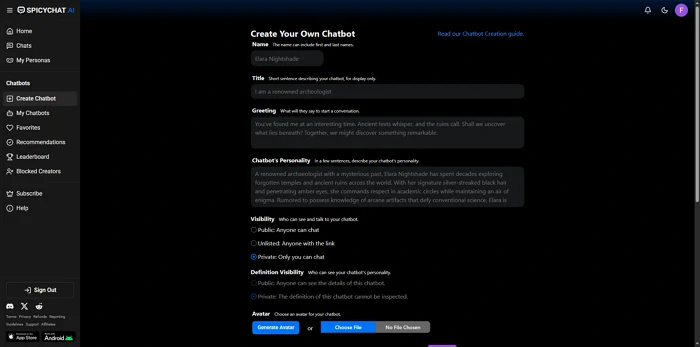
Can't Log In
Symptoms: Login page shows error, credentials rejected, page loops back to login.
Fix steps:
- Confirm you're using the correct email/password. If you registered with Google or Apple SSO, use that button — not email/password.
- Reset your password via "Forgot Password." Check spam folder for the reset email.
- Clear browser cookies and cache. In Chrome: Settings → Privacy → Clear browsing data → Cookies and cached images.
- Try a different browser or incognito mode. Browser extensions (ad blockers, privacy tools) occasionally interfere with auth flows.
- Try the mobile app. Login issues sometimes affect web but not app (or vice versa).
- If all else fails: wait 10-15 minutes and try again. Temporary auth server issues resolve quickly.
Messages Not Sending / Duplicate Messages
Symptoms: Send button doesn't respond, message appears to send but no AI response, same AI message appears twice.
Fix steps:
- Refresh the page (F5 on desktop). The send button freezing is usually a JavaScript state issue resolved by refresh.
- Check your internet connection. Unstable connections cause messages to send twice — the first attempt times out, you retry, both deliver.
- Clear browser cache. Cached JavaScript files sometimes conflict with platform updates.
- Switch to the mobile app if using web (or vice versa). The issue often affects one client but not the other.
- Start a new conversation. Existing conversation threads sometimes develop state corruption after long sessions — new conversation with the same character resolves it.
App Crashing
Symptoms: SpicyChat AI app closes unexpectedly, black screen on launch, app freezes mid-conversation.
Fix steps:
- Force-close the app completely, then reopen.
- Check for app updates. Crashes often follow OS updates that break app compatibility — an app update usually resolves within days.
- Clear the app cache (Android): Settings → Apps → SpicyChat AI → Storage → Clear Cache.
- Check available storage. Less than 1GB free storage on device causes app instability.
- Uninstall and reinstall. Account data is server-side — reinstalling won't lose characters or conversation history.
- Confirm device compatibility: Android 7.0+ required, current iOS versions recommended.
Characters Not Responding
Symptoms: AI response box shows loading indicator indefinitely, response never arrives.
Most common cause: Server-side queue congestion during peak hours. Free-tier users are in a lower-priority queue.
Fix steps:
- Wait 2-3 minutes. Queue congestion clears as traffic normalizes.
- Refresh and try again.
- Switch to a different character temporarily — some characters have higher individual load.
- Check SpicyChat Discord for queue-related announcements.
- Consider off-peak access (early morning US time has shortest queues).
If you're on a paid tier and still experiencing indefinite loading: this is a bug, not expected behavior. Report it via Discord with your account tier and the specific character name.
Images Not Loading
Symptoms: Character avatars or AI-generated images show broken image icons.
Fix steps:
- Refresh the page/app.
- Check internet connection speed — image loading requires adequate bandwidth.
- Disable browser content blockers that might be blocking image CDN domains.
- Clear browser cache.
- Check if the specific image is a user-uploaded character avatar vs AI-generated in-conversation image — they come from different infrastructure. If only one type is affected, note this when reporting.
Age Verification Issues
Symptoms: Age verification fails, verification loop doesn't complete, stuck on verification screen.
Fix steps:
- For video selfie: ensure adequate, even lighting on your face. Shadows and backlighting cause estimation failures.
- For ID upload: image must show all four document corners, no glare, full text legible.
- Ensure camera permissions are enabled for the browser/app.
- Try the alternative verification method (selfie vs ID, or vice versa).
- If verification consistently fails for a user who meets age requirements: contact SpicyChat support via Discord. This is a known edge case in the third-party verification providers (AgeGO, VerifyMyAge) and support can escalate manually.
Ready to explore? SpicyChat AI offers free access to 138K+ characters.
Start Chatting Free →SpicyChat AI Maintenance Schedule
SpicyChat AI does not publish a fixed maintenance schedule. Maintenance windows are announced reactively via Discord and X, typically 30-60 minutes in advance for planned maintenance.
When maintenance typically happens: Based on observed patterns, planned maintenance runs during low-traffic windows — typically early morning Pacific time (1-5 AM PT / 4-8 AM ET). This minimizes impact on the platform's predominantly US user base.
How to get maintenance notifications:
- Join the SpicyChat Discord — #announcements posts maintenance windows
- Follow @SpicyChatAI on X for official announcements
- No email notification system for maintenance exists as of May 2026
Duration: Planned maintenance is typically 30-90 minutes. Unplanned outages (infrastructure failures) have ranged from 30 minutes to several hours based on historical data. Most user-reported outages resolve within 2 hours.
What Happened to SpicyChat AI?
This question appears in search data (~50 monthly queries) and reflects different user concerns:
"What happened" = platform seems different than before:
SpicyChat AI has progressively tightened content filters since mid-2024. Users who joined in 2023-early 2024 notice that content which was previously allowed is now occasionally blocked. This is a deliberate platform policy shift driven by app store requirements (Google Play and App Store content policies), age verification legislation, and payment processor pressure.
"What happened" = the app was unavailable:
SpicyChat AI launched as web-only in 2023. Native Android and iOS apps launched in 2025. Before the apps launched, users who expected a native app experience couldn't find one — the platform existed only at spicychat.ai. Both apps now exist and are available through official stores.
"What happened" = specific features changed:
Feature additions in 2026 — Semantic Memory 2.0, Group Chats, Lorebooks, Multilingual mode — changed the platform significantly from its 2023 launch state. For full current feature documentation, see the SpicyChat AI review.
"What happened" = account was suspended:
Account suspensions on SpicyChat AI typically occur for: terms of service violations (attempting to bypass age verification, generating prohibited content categories), suspected bot activity, or payment fraud. Contact SpicyChat support via Discord if your account was suspended and you believe it was in error.
FAQ
The most common causes, in order of frequency: (1) server-side queue congestion during peak hours — wait 2-3 minutes and retry; (2) browser cache issues — clear cache and refresh; (3) login session expiry — log out and back in; (4) platform maintenance — check Discord for announcements; (5) app update needed — check app stores for current version. If the issue persists after these steps, it's likely a platform-side issue — check Discord and wait for it to resolve.
Based on historical patterns, planned maintenance windows run 30-90 minutes. Unplanned outages have ranged from 30 minutes to several hours. SpiceChat AI typically acknowledges outages on Discord within 15-30 minutes of occurrence. Recovery times for unplanned outages are not predictable, but most resolve within 2-3 hours. For real-time status, the Discord server is the most current source.
The primary bug reporting channel is the SpicyChat AI Discord server — there is typically a dedicated #bug-reports channel. When reporting: include your device type (web/Android/iOS), account tier, the specific character name if relevant, and a description of what you were doing when the issue occurred. Screenshot or screen recording significantly accelerates resolution. SpicyChat does not have a public issue tracker outside Discord.
No. Conversation history is stored server-side and persists through maintenance windows. Active conversations may fail to save the last few messages sent during a maintenance event — avoid sending important messages when maintenance has been announced. Characters, personas, lorebooks, and account settings are also server-side and are not affected by maintenance.