SpicyChat AI Character Creation: Complete Guide to Custom AI Companions
The difference between a generic SpicyChat AI character and one that feels genuinely immersive comes down to four fields: personality definition, scenario context, example conversations, and behavioral hooks. Most users fill in a name and skip the rest. This guide covers all of them.
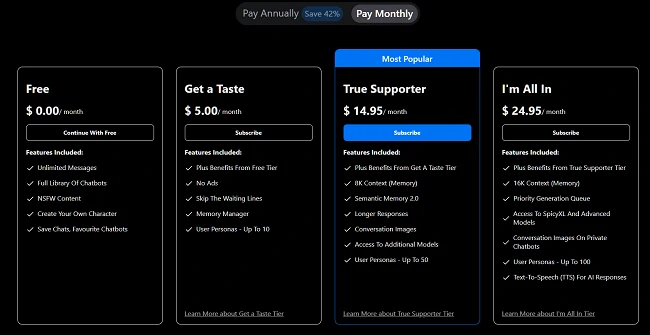
SpicyChat AI's character creation system is available to all users, including the free tier. You can create unlimited characters at no cost. What changes with premium tiers is context window size (4K free → 16K on I'm All In) — which directly affects how much character context the AI can hold in any single conversation.
How Character Creation Works on SpicyChat AI
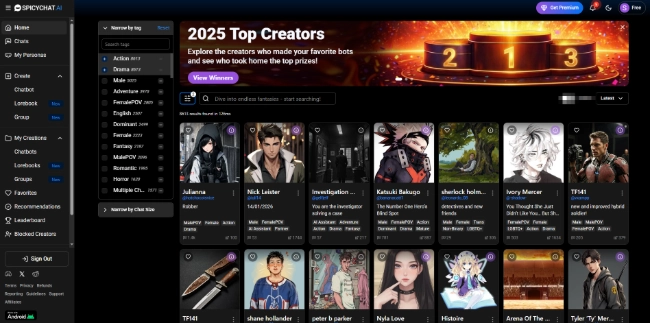
SpicyChat AI uses a structured form-based character creation system. When a user starts a chat with your character, the AI receives the full character definition as context — essentially a system prompt that shapes all responses. The more specific and well-structured that definition, the more consistently the AI performs.
Free tier capability: Create unlimited characters with full access to all creation fields. The constraint is the 4K token context window, which limits how much of your character definition the AI can actively reference at once. Longer personality descriptions and example conversations may get partially truncated on the free tier.
Premium tier advantage: True Supporter (8K context) and I'm All In (16K context) can hold substantially more character definition in active context. This is where lorebooks — which add world context dynamically — become more effective.
Step-by-Step: Creating Your First Character
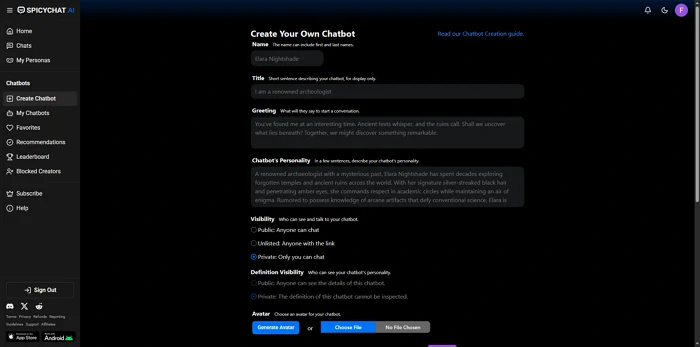
1. Name & Title
The name is what the AI responds to and what users see in the character library. Make it specific rather than generic — "Aria" is forgettable; "Aria Voss, former intelligence analyst" carries immediate character implication.
The title field appears under the name in the library listing. Use it to signal the character's category and tone in one line. "A cold professional with a hidden past" tells prospective users what to expect. This field affects discoverability when users browse by character type.
2. Writing the Perfect Greeting
The greeting message is the first thing a user sees when they start a conversation. It sets the entire tone.
Strong greetings accomplish three things simultaneously: they establish the character's voice, situate the scene, and invite engagement. Weak greetings are static — "Hello, how are you?" — which gives the AI no behavioral signal and the user nothing to respond to.
Structure to use: [Character's emotional state or action] + [Setting or situation] + [Hook that requires response]
Example: "The file on her desk is already flagged confidential. She glances up without expression. 'I wasn't expecting company. Sit down — or don't. Your call.'"
This establishes: character type, setting, emotional register, and an implicit prompt for the user to respond.
3. Personality Definition
This is the highest-impact field. The personality definition is the AI's behavioral rulebook for the character.
Write it in the second person, present tense, as if instructing the AI: "You are [Name]. You speak in short, direct sentences. You distrust warmth from strangers. You show dry humor through understatement rather than jokes."
Avoid adjective lists ("charming, intelligent, mysterious"). Translate adjectives into behavioral descriptions: not "intelligent" but "you reference specific data when making arguments and correct factual errors without softening the delivery."
Include: communication style, emotional baseline, what the character wants from the conversation, how they react under pressure, and any hard boundaries or consistent behaviors.
Length recommendation: 150-300 words for the free tier (stays within 4K context), 400-600 words for premium tiers.
4. Scenario Context
The scenario context sets the world and situation the character exists in. Think of it as the stage directions.
Define: the physical setting, the time period, the character's current circumstances, and their relationship to the user character at the start of the conversation. A scenario context of "You work as a private investigator in 1940s Los Angeles. The user has just walked into your office claiming their spouse is missing" is immediately playable.
Avoid: vague settings ("a magical fantasy world"). The more specific the scenario, the less the AI has to invent — and AI-invented context is less consistent than creator-defined context.
5. Example Conversations
Example conversations are the most powerful tool for controlling character voice. They function as few-shot examples that train the AI on this specific character's speech patterns.
Format: Alternate between a generic user input and the character's ideal response. Include 3-5 exchanges minimum.
- Start with a direct question and a characteristic answer
- Include one emotionally loaded exchange showing how the character handles conflict or vulnerability
- Include one exchange showing the character's humor or verbal tics if any
The AI extrapolates from these examples. If your examples are specific and distinctive, the AI's unscripted responses will match that register. If your examples are generic, the AI defaults to its baseline persona.
6. Advanced Settings & Behavioral Hooks
Behavioral hooks are conditional instructions: "When the user mentions [X], you respond with [behavior Y]." They're useful for: defining hard topic responses, creating recurring character behaviors, and ensuring the AI handles sensitive subjects consistently.
Example hooks:
- "When the user becomes aggressive, you become quieter and more precise — never defensive."
- "When asked about your past, you deflect with a question before eventually answering."
- "When the scenario turns intimate, you shift from third-person description to present-tense second-person narration."
Advanced settings also include visibility (public vs private), NSFW toggle for the character, and tag categorization for library discoverability.
Ready to explore? SpicyChat AI offers free access to 138K+ characters.
Start Chatting Free →Using Lorebooks for Worldbuilding
Lorebooks are knowledge files you attach to a character. They work through a trigger keyword system: when a defined keyword appears in the conversation, the corresponding lorebook entry is injected into the AI's context.
This solves a specific problem: context window limits mean you can't load all your worldbuilding into the character definition. Lorebooks let you store that information and deliver it on-demand.
Creating lorebook entries:
Each entry has: a trigger keyword (or multiple keywords), and the content that activates when that keyword appears. Entry length matters — keep each entry concise (50-150 words) to maximize the number of entries that fit within the context window when triggered.
Example lorebook structure for a fantasy setting:
- Trigger: "Ironmere" → Entry: "Ironmere is the capital city, governed by a council of seven Merchant Lords. The city sits at the junction of two rivers and controls 70% of the kingdom's grain trade. The current council is fractured — three lords support the new mining contracts; four oppose them."
- Trigger: "Council" → Entry: "The Merchant Lords are: Calloway, Vex, Rothair, Sable, Thennis, Orvain, and Maris. Calloway is your contact. Vex is an enemy. The rest are neutral or unknown."
Best practices:
- Use specific trigger words that won't appear accidentally in casual conversation
- Keep entries factual rather than narrative — the AI handles narration; lorebooks handle facts
- Organize by category: locations, characters, factions, rules, history
- Test triggers in a real conversation before finalizing
User Personas — Playing Different Roles
Personas let you define who the user character is in a conversation, separate from the AI character. SpicyChat AI allows 3 personas on the free tier and up to 50 on the I'm All In tier.
A persona defines: your character's name, appearance, personality, and any relationship to the AI character established before the conversation begins. The AI incorporates this when generating responses.
Creative uses for multiple personas:
- Run the same AI character in completely different relationship contexts (strangers, enemies, established lovers)
- Test how your AI character responds to different user personality types
- Create distinct roleplay identities for different story genres
Personas switch instantly. You can move from one roleplay context to another without creating a new conversation.
Tips for Better AI Responses
Prompt engineering basics for SpicyChat AI:
The quality of AI responses scales directly with the specificity of user input. "Tell me about your past" gets a generic response. "Your hands are shaking slightly. What happened in Prague, and why did it end the way it did?" triggers character-specific, emotionally loaded responses.
Handling OOC (out-of-character) issues:
Out-of-character breaks happen when the AI steps out of the persona to comment on the roleplay or add system-like messages. When this occurs: respond in-character as if the OOC content didn't appear, and include a parenthetical at the end of your message: "(Please stay in character as [Name] — no OOC commentary)." This instruction is usually effective for the next several exchanges.
Working within token limits:
On the free tier's 4K context window, long conversations degrade as early context drops off. Strategies to manage this:
- Periodically summarize prior events in a user message: "(To summarize what's happened so far: [2-3 sentence summary])"
- Keep character definitions concise so more of the window is available for conversation
- Use lorebooks for world context rather than loading it all into the character definition
Memory management strategies:
For the True Supporter and I'm All In tiers with Semantic Memory 2.0: the system stores a compressed summary of prior sessions. You can reinforce important facts by referencing them explicitly in early conversation — "As you remember from last time, [fact]." This increases the probability that Semantic Memory retains those details.
Ready to explore? SpicyChat AI offers free access to 138K+ characters.
Start Chatting Free →Best SpicyChat AI Characters to Try
The character library at 138,000+ entries makes browsing daunting. Category filtering narrows it:
High-quality categories:
- Romance: AI girlfriend and boyfriend personas with defined personality depth
- Fantasy adventure: Quest companions, antagonists, morally complex nobles
- Thriller/noir: Investigators, spies, morally ambiguous professionals
- Historical: Period-accurate personas with contextual knowledge
- Sci-fi: AI companions, spaceship crews, future societies
Use the tag filter to narrow by: NSFW level, character type, relationship type, and genre. Sort by "Most Popular" for community-validated quality indicators.
FAQ
SpicyChat AI allows unlimited character creation on all tiers, including the free tier. There's no stated cap on the number of characters you can create or manage. The practical limit is organization — managing hundreds of characters requires consistent naming and tagging.
Yes. Public characters are visible in the SpicyChat AI community library and accessible to all users. When you set a character to public visibility, other users can start conversations with it. You can also keep characters private — accessible only to you. There's no direct character sharing via link outside the platform library.
Within a session, the context window holds all conversation history up to the window limit (4K/8K/16K tokens). Across sessions, Semantic Memory 2.0 (True Supporter tier and above) stores a compressed summary of prior interactions. To reinforce specific memories, reference them explicitly early in new sessions. The more explicitly a fact is stated, the more reliably the memory system retains it.
OOC stands for "out of character" — when the AI breaks the roleplay persona to address the conversation directly or make meta-commentary. It happens when prompts are ambiguous, when content triggers moderation edge cases, or when the AI loses track of the character definition. Handle it by continuing in-character and appending a brief parenthetical instruction: "(Stay in character as [Name], no OOC)." For recurring OOC issues, check whether the character's scenario context or behavioral hooks need to be more explicit about maintaining persona.